Directory Visibility and Update Instructions
Berkeley respects individual privacy and abides by UC policy and state and federal laws that protect individual privacy. More information on campus IT policy is available on the IT Policy website.
The Campus Directory contains person information from Student Information Systems (SIS), UCPath (Human Resources system), Alumni systems, Sponsored Guest systems, and the public-facing campus directory (directory.berkeley.edu). The following details the release policy for information contained in the CalNet directory:
- Some information is added to the Campus Directory via the campus directory update tool. This information is then publicly available via the campus directory.
- Some information is always available to campus applications and departments via secure data sharing processes. This data is not available to off-campus entities.
- Some information is always private and is not released to campus applications or departments without approval from campus data owners (Office of the Registrar for student data and the Office of Human Resources for employee and affiliate data).
Data Privacy and Visibility Matrix
This article provides a mapping of campus data elements to their source systems, access permissions, and public visibility status. It outlines the governing CalNet release policies for each attribute. Use the table in the link below to see which parts of your campus profile—such as your name, email, and department—are visible in the Campus Directory.
Reference: View the Data Privacy and Visibility Matrix (KB0015658)
How to Update Your Directory Listing
1. Log in at the CalNet Account Manager: https://bpr.calnet.berkeley.edu/account-manager/
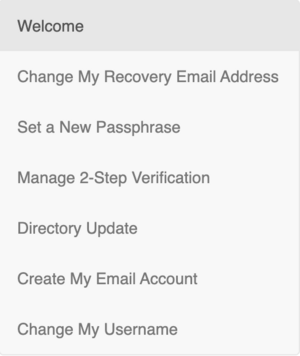
2. Select Directory Update from the main menu:
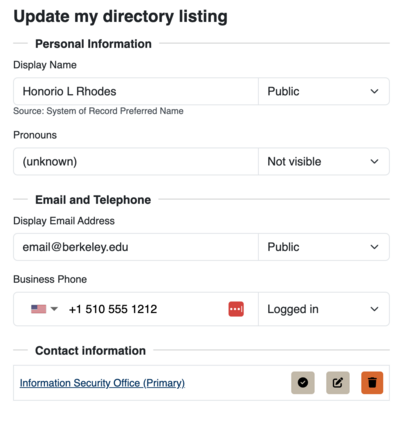
In the update app, you will see your name, pronouns, and contact information fields. Additional instructions for updating your data or display settings are available inside the application.
Updating Name and Pronouns
Name and pronouns are not editable directly in the directory; those fields must be updated in the system of record:
- Employees: Update via UCPath.
- Students: Update via CalCentral (Gender Recognition and Lived Name).
Updating Contact Information
Employees can directly edit their campus email address, phone number, website, and campus address within the Directory Update app.
Managing Privacy Settings
All users can edit privacy settings for each data field:
- Public: Everyone can search and see this information.
- Logged in: Only users logged into their CalNet account can search and see this information.
- Not visible: No one can search or see this information.
Important Note: If you select "Not visible" for your Display Name, none of your information can be searched or seen by others in the campus directory.
Campus Directory Privacy Specifics
Employee Privacy
Information about who works for the University is considered public information. Although employees can choose not to include address or contact information in their Directory listings, their name will remain listed. Many units and departments require employees to have their directory information available in the authenticated (Logged in) directory.
Student Privacy and Confidentiality
Students may choose not to include their name in the public-facing campus directory, but this data remains available in the authenticated Campus Directory and to campus applications/departments. Students can request to make their records confidential via the Registrar's office.
- Confidential status affects not only the Directory listing but all school records.
- The Registrar requires a strong reason before granting confidential status.
- Contact the Registrar for more info: https://registrar.berkeley.edu/?PageID=FAQS.html