There are a variety of communication tools and options in bCourses, and they are available in different locations throughout a course site for your convenience.
This article provides a summary of each tool to help you choose which one use, when they are best used, and where you can find them.
- Announcements
- bCourses Mailing List
- Chat
- Conferences
- Conversations/Inbox
- Discussions
- “Message students who..”
Announcements
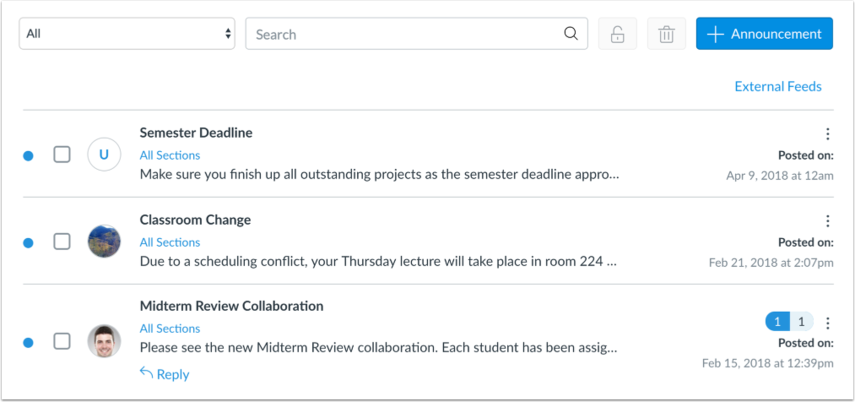
Key features:
- Announcements are saved in your course site, as well as sent to all members of your site
- Students can respond to announcements, which creates a discussion-forum-like thread. (If you would like to disable this feature, please see this Canvas Guide: How do I disable announcement replies for an entire course?)
Where to find it:
- Course Navigation menu
Use “Announcements” for:
- Sending messages to everyone in your site, and linking them to your course materials or external resources
- Sending weekly updates and/or reminders to students
- Starting an online discussion forum with students (By default, students can comment on an announcement. To disable this option, see this Canvas Guide: How do I disable announcement replies for an entire course?)
More information:
- Canvas Guide: What are Announcements?
bCourses Mailing List
Key features:
- List allows instructors to send messages directly from their email programs, rather than using the Inbox in bCourses
- Membership is updated daily according to enrollments in the People tool
- Can also send automated messages to newly-enrolled students using the Welcome Email feature
Where to find it:
- bCourses Mailing Lists can be created by instructors within their own course site. To get started, enable the Mailing List tool in your course navigation by following the steps in How do I manage Course Navigation links?
Use “bCourses Mailing List” for:
- Sending mail to your class using your email program
More information:
- What is the bCourses Mailing List?
- How do I send a welcome email to newly enrolled students with the bCourses Mailing List tool?
Chat
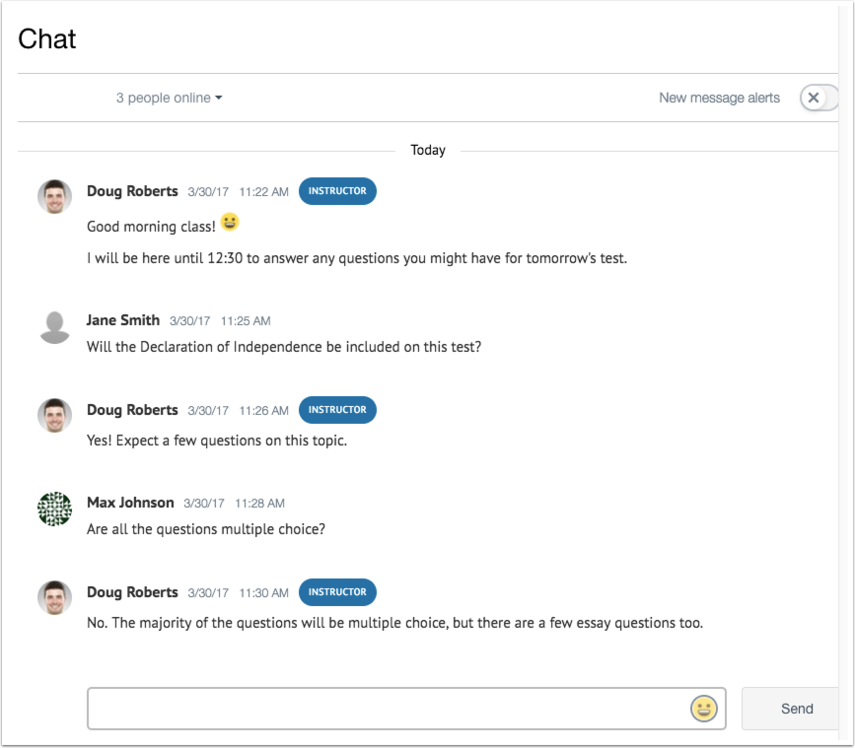
Key features:
- Chat allows real-time and immediate communication between course site members who are in the site at the same time
- Chat conversations are saved and viewable by everyone
Where to find it:
- Course Navigation menu
Use “Chat” for:
- Real-time interaction and discussion
- Asking and addressing FAQs (for longer, more in-depth meetings online, use the Conferences tool)
More information:
- Canvas Guide Video: Chat Overview
BigBlueButton (Formerly Conferences)
While bCourses has a built-in "BigBlueButton" Conference feature, we strongly recommend that instructors use Zoom instead. Zoom is also integrated with all bCourses sites. Learn more at our Zoom for Instruction Service Page.
Conversations/Inbox
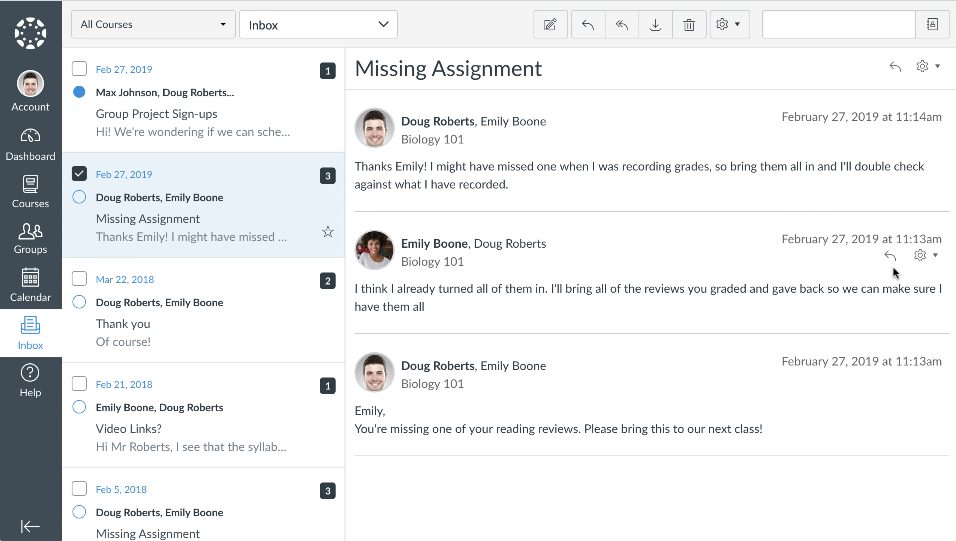
Key features:
- Filter recipients by group, section, or individual members
- Messages are sent directly to recipients’ emails, as well as saved in the Sent folder within the Inbox
- Recipients can respond from their email accounts
Where to find it:
- The Help Corner
- Grades
- People
Use “Inbox/Conversations” for:
- Sending messages to individual students, groups, or sections
More information:
- Canvas Guide: How do I send a message to a user in a course in the Inbox as an instructor?
- Canvas Guide: How do I send a message to all course users in the Inbox as an instructor?
- Canvas Guide: How do I use the Inbox as an instructor?
Discussions
Key features:
- Asynchronous, online communication forum
- Subscription option notifies subscribers of activity in a discussion
- “Like” option to give visibility to noteworthy posts/replies
- Video embeds allow more personalized responses
- Can be graded
Where to find it:
- Course Navigation menu
Use “Discussions” for:
- FAQs - Create a discussion forum where students can post frequently asked questions about the class that their classmates or instructors can respond to
- Extend a conversation that began during class
- Brainstorming and debating
More information:
- Canvas Guide: What are Discussions?
- Canvas Guide: How do I create a Discussion as an instructor?
- bCourses KB Article: How do I set up and grade Discussions with multiple due dates?
- Canvas Guide: How do I create a graded Discussion (including multiple due dates) as an instructor?
“Message Students Who..”

Key features:
- Allows instructors to send targeted messages from within the gradebook to students who have not submitted an assignment; have not received a grade; scored less than [point value]; scored above [point value]
- The message is sent as a blind copy, which means students do not see who else is receiving the message.
Where to find it:
- Gradebook
Use “Message Students Who..” for:
- Contacting at-risk students who may be falling below a passing grade for an assignment
- Recognizing students who did well on an assignment
- Alerting students whose submissions have not yet been graded
More information:
These are the tools that help students and instructors communicate from within bCourses. Do you have more specific, detailed questions? First, please search the Canvas Instructor Guide, or our bCourses Knowledge Base. If you find that you are not able to find the help article that you need, submit a Help Request form or sign up for a one-on-one meeting on our Consultation Calendar.
For more on Getting Started with bCourses, see these articles:
- Getting Started: Site Setup and Management
- Getting Started with bCourses: Organizing Your Course Site
- Getting Started with bCourses: Assignments & Grading