Touch ID authentication is currently only available for users with macOS and Chrome.
How to Enroll Your Touch ID Device
- Make sure you have a device that supports Touch ID (Currently macOS with Chrome ONLY)
- Have access to your charged laptop computer with an internet connection.
- Log in to CalNet Account Manager and select Manage 2-Step Verification from the menu on the left. Or click here to navigate directly to it.
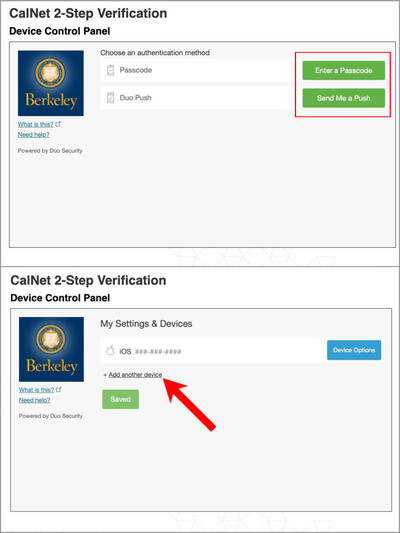
- Click Start Setup in the Device Control Panel. (Note: If you’ve already enrolled a primary device, you will be prompted instead to Choose an Authentication Method. Choose one of the options (i.e. Passcode, Duo Push), and perform the appropriate verification actions, which will take you to My Settings and Devices. Then select Add Another Device, which appears as a small link below your current list of devices.)

- Select Touch ID and click Continue.

- Duo will ask you to make sure that you're not blocking pop-up windows for the enrollment site before continuing with Touch ID. Press Continue.

- When prompted, tap the Touch ID button in the Touch ID enrollment window for approval.

- You may also be asked if you want to allow Duo to access information about Touch ID (click Allow if prompted).
- Place your finger on the Touch ID button in the Touch Bar.
- A "Success!" message should appear. Congratulations! You have enrolled Touch ID.

Enrollment Completed!
Congratulations! You’ve successfully enrolled your Touch ID device. Now when you log in to campus systems with your CalNet ID, you will be prompted for a second-step verification. Select Touch ID from the Device dropdown, and then select Use Touch ID, in the DuoSecurity login. (See How to Do the CalNet 2-Step for more information.)
Troubleshooting
- Touch ID for 2-step verification will not work in an incognito window
- Clearing Chrome's "Passwords and other sign-in data" will deactivate your Touch ID. If you clear this data on your computer, you will have to remove and re-add your device from your 2-Step account by going to the device management portal at mycalnet.berkeley.edu
Be sure to get your backup passcodes! Click here to find out how.