How CAS Works
Contents
CAS Authentication Overview
For an overview of simple authentication with CAS at UC Berkeley, see: Simple Authentication with CAS. To get the most up-to-date information on how CAS works, please visit the Apereo CAS website and in particular the CAS documentation site. The CAS protocol and web flow are described in the CAS Protocol page.
Testing CAS Login
To test if CAS login is working on your campus application, use the URL https://auth.berkeley.edu/cas/login specifying the "?service=" parameter as part of the URL.
Example: https://auth.berkeley.edu/cas/login?service=http://www.berkeley.edu
Adding the service parameter for a berkeley.edu site after the base login URL will display the specified site following successful authentication to the CAS server. CAS client applications automatically specify this service parameter when redirecting the browser to the CAS server so that the CAS server can later send the browser back to the application's protected page following authentication.
CAS Web Flow
See diagram at https://apereo.github.io/cas/development/images/cas_flow_diagram.png
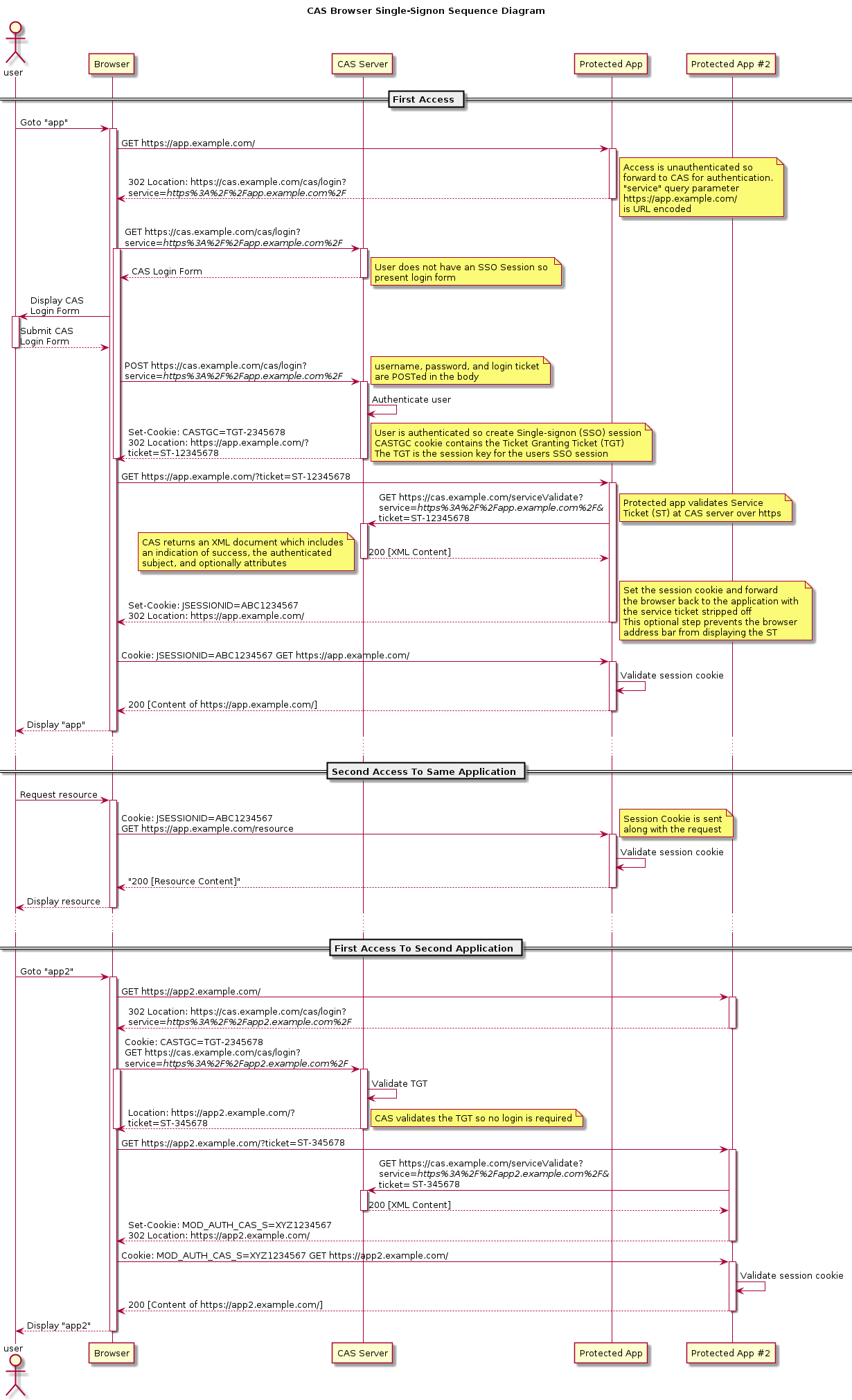
- A user, via a web browser, requests a resource from a particular web application or service.
- The web application or service, via the application's security mechanism, determines if the user has already been authenticated (authN) and authorized (authZ) to use the application.
- It should be noted that all applications should implement local sessions for managing the interaction between the application and the user. If a user comes to the web application and the application does not know who the user is, then the application should redirect the user to the CAS server.
- If the user has a local session, authN and authZ, then the user can have access to the resource which was requested and the flow ends here.
- If the user does not have a local session, then the web application should check to see if the URL contains a CAS ticket. If the URL does not contain a CAS ticket, then the web application needs to redirect the browser to the CAS server with the return service URL as a
?service=argument. For example:https://auth.berkeley.edu/cas/login?service=https://myservice.berkeley.edu/myapp
- Once the user's browser gets to CAS, CAS looks to see if the user has already authenticated with CAS by checking if the browser sent a CAS cookie with the request. If the user does not have a cookie because they have not already authenticated, then CAS displays the login screen. See Re-authentication or
renew=truefor information about the protocol option which forces CAS to request credentials regardless of the presence of the CAS cookie. - Upon successful authentication, CAS will look up the user in the CalNet LDAP directory and store the user's CalNet UID in its memory. It sets a CAS ticket granting cookie (TGC) in the user's browser, and then redirects the user back to the original service with a ticket. For example:
https://myservice.berkeley.edu/myapp?ticket=QQIMux0k2Em
This ticket is only valid for the service to which CAS redirects the browser, and can only be used once. Also, the ticket has a limited lifespan (about 12 s) and is tied to the UID mentioned above. - Once back at the application, the security component again checks for a valid session. This time, the web application sees the ticket in the URL and verifies its legitimacy with CAS using the CAS protocol 3.0 endpoint, for example:
https://auth.berkeley.edu/cas/p3/serviceValidate?service=https://myservice.berkeley.edu/myapp&ticket=QQIMux0k2Em
This HTTP request must be performed over TLS to the CAS server. - When CAS receives this request, it validates the ticket with two tests:
- Is this the first time this ticket is being presented back to CAS?
- Is the ticket actually valid for the service listed in the URL?
- If both tests are true, CAS looks up the UID associated with the ticket and responds to the application with a success response (including the UID and optionally any allowed attributes). If false, CAS responds with a failure response.
- The web application parses the response and determines if it should grant access to the resource originally requested.
- If the application only requires authentication, it can create a local session. If it needs further verification (authZ), it can examine additional attributes via SAML 1.1 or CAS 3.0 protocols.
For a more in-depth look at how the above works, please read the official Apereo CAS protocol documentation.
Renew=True
Application owners who do not wish to use Single Sign-On for a particular application can force the browser to request credentials for CAS even if the browser has been previously authenticated. This is called renew, and the feature is outlined in section 2.1.1. parameters of the CAS documentation on the CAS Protocol.
CAS Login and Logout
Please see the CAS Login and Logout Scenarios KB article.
CAS Availability
The CAS service is made highly available for both on-premises and public cloud applications via load balancing and DNS failover. In a scenario where DNS failover occurs, there will be up to a 90 second delay before client requests are routed to a different physical location. After that, users will be required to re-authenticate to their applications.
Normal Conditions
An application that depends on CAS will typically follow this flow:
- A CAS client attempts to authenticate.
- The
berkeley.eduDNS resolvers return a referral to offsite resolvers. - The client queries offsite resolvers and is given the IP of the Berkeley VIP (configured as primary).
- The client's request goes to the VIP at UC Berkeley.
- Traffic is load balanced to a cluster of servers.
Failover Conditions
If the Berkeley data center is unavailable, health checks in our hosted zone mark Berkeley as unavailable and return the virtual IP of the CAS cluster in San Diego:
- A CAS client attempts to authenticate using a name server at San Diego.
- The
berkeley.eduDNS resolvers at San Diego return a referral to offsite resolvers. - The client queries the offsite resolvers and is given the IP of the San Diego VIP (configured as secondary).
- The client's request goes to the VIP at San Diego.
- Traffic is load balanced to a cluster of servers.