How do I Login to my SPA Account's Email Inbox?
A knowledge base article about How do I Login to my SPA Account's Email Inbox? provided by the UC Berkeley IT Service Hub - Knowledge Portal
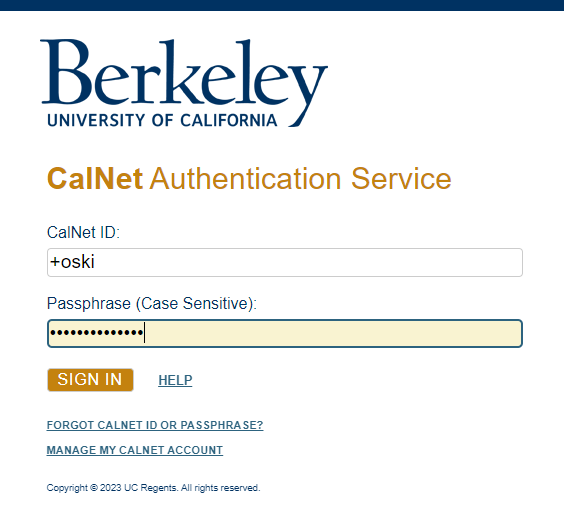
- Go to bMail and when prompted, enter your CalNet Credentials in the following format:
- Under CalNet ID enter a “+” sign before your CalNet ID
- Under Passphrase, enter your CalNet passphrase
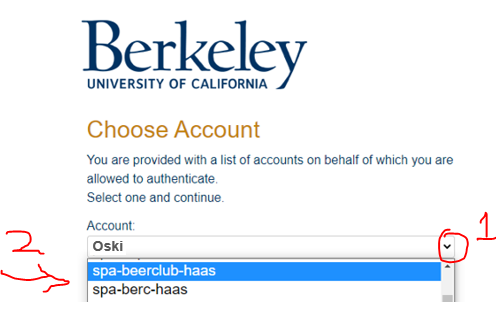
- On the next screen click on the pull down menu to the right of your CalNet ID and choose the account that you would like to access. Click the “SIGN IN” button.
- That's it! You have logged in to your SPA Account’s email and you should see the Inbox on the upper left hand corner. If your SPA is associated with a Haas Club, these are usually full accounts, which come with email, calendar, contacts, drive, etc. like any other bConnected account.
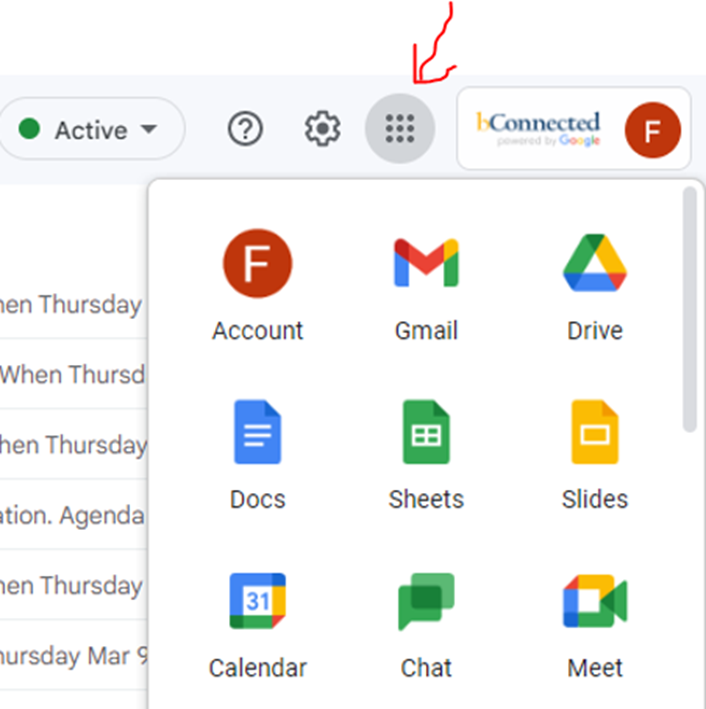
To access the other apps just click on the grid on the upper right hand corner.